

The email and SMS marketing platform AI agents can use end to end.
Connect Claude, ChatGPT or any AI agent to Octeth with one URL. Plan and send campaigns, build segments, run SMS and journeys, and ask your numbers anything, in plain language. 124 tools, on your own servers.
This is the MCP server of your email marketing platform, not a mailbox reader. The agent works with your lists, campaigns and reports.
Works with Claude, ChatGPT, Claude Code, Codex, Gemini CLI and any remote MCP client.
Example: Create a campaign
- You: Copy last month's roastery notes, update the dates for November and send me a test.
- The assistant calls the Octeth tool copy_campaign.
- The assistant calls the Octeth tool update_campaign.
- The assistant calls the Octeth tool send_test_email.
- Assistant: Done. "November notes from the roastery" is a draft with the new dates, and a test is in [email protected]. Nothing has gone to subscribers.
Example: Explain results
- You: How did "Last call: Holiday Blend" do compared with our previous five campaigns?
- The assistant calls the Octeth tool list_campaigns.
- The assistant calls the Octeth tool get_campaign_stats.
- Assistant: Below your recent average. It went to 5,742 people. Opens: 30.2% vs 35.4%. Clicks: 3.7% vs 5.4%. Unsubscribes: 10.
Example: Text a flash sale
- You: Cost a flash-sale text to subscribers who opted in to SMS. Don't send it yet.
- The assistant calls the Octeth tool create_sms_campaign.
- The assistant calls the Octeth tool estimate_sms_campaign.
- Assistant: The draft is ready and costed. Say the word and I'll text you a test first. Sendable numbers: 1,186. Parts per message: 1.
Demo with a fictional coffee roaster's account.
Walkthrough
From idea to inbox in one conversation
A win-back campaign, start to finish, without opening the app. The agent picks the tools, Octeth does the work, and you approve the send.
- 1
Build the audience
The agent reads the segment rule vocabulary, then creates a valid segment on the first try.
create_segment - 2
Write and test two versions
Two drafts, both spam-tested. Drafts reach nobody.
create_campaignspam_test_email - 3
Count and send a test
The segment holds 217 people. A test goes to your own inbox.
get_segment_countsend_test_email - 4
Schedule, with your yes
Octeth returns a preview with the recipient count and waits. The send happens only after you approve.
schedule_campaign - 5
Ask how it did
Stats and link clicks, compared with your last five campaigns, plus a suggested next step.
get_campaign_statsget_campaign_link_clicks
- You: Build a segment of customers who bought last spring, March to May, but haven't opened anything in 60 days. Don't send anything yet.
- The assistant calls the Octeth tool get_segment_rule_vocabulary.
- The assistant calls the Octeth tool create_segment.
- Assistant: Created "Spring buyers, quiet since" in Customers: last purchase between March 1 and May 31, and no opens in the last 60 days.
- You: Write two versions: A leads with 15% off, B with what's new at the roastery. Spam-test both.
- The assistant calls the Octeth tool create_campaign (x2, drafts).
- The assistant calls the Octeth tool spam_test_email (x2).
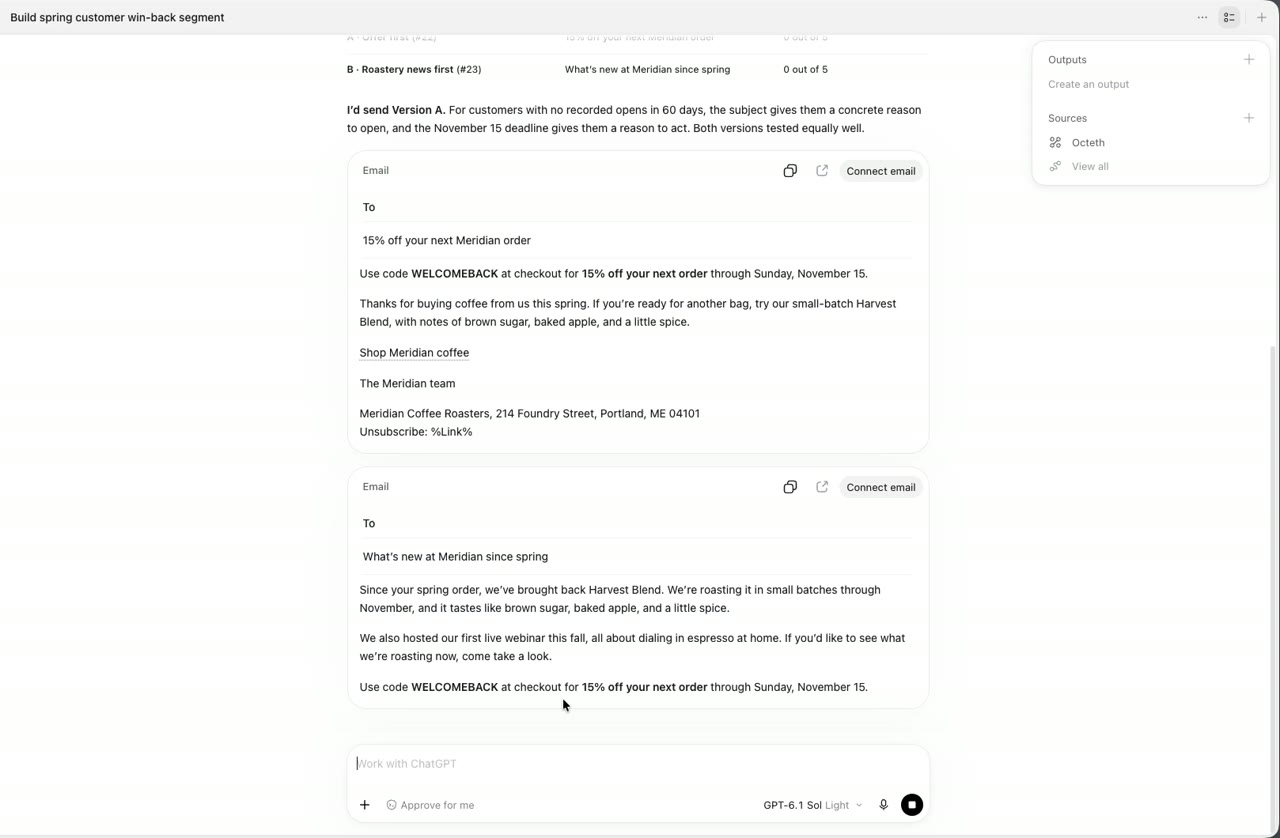
- Assistant: Both drafts are saved. I'd send A: the offer is in the subject line. Version A spam score: 0 of 5. Version B spam score: 0 of 5.
- You: How many people is that? Send me a test of A.
- The assistant calls the Octeth tool get_segment_count.
- The assistant calls the Octeth tool send_test_email.
- Assistant: 217 subscribers. The test of version A is in [email protected].
- You: Schedule A for Thursday at 10:00 New York time.
- The assistant calls the Octeth tool schedule_campaign.
- Octeth asks for approval. Campaign: Win-back, version A. When: Thu, Nov 12, 10:00 New York. Recipients: 217. You reply: Yes, schedule it.
- The assistant calls the Octeth tool schedule_campaign (with confirm token).
- Assistant: Scheduled for Thursday at 10:00 New York time.
- You: Next day. How did "Last call: Holiday Blend" do against the last five?
- The assistant calls the Octeth tool get_campaign_stats.
- The assistant calls the Octeth tool get_campaign_link_clicks.
- Assistant: Weaker than usual. Most clicks went to the shop page. I'd resend to the non-openers on Thursday morning with a new subject line. Opens: 30.2% vs 35.4% avg. Clicks: 3.7% vs 5.4% avg. /shop/holiday-blend: 170 clicks.
Recorded session
The same flow in a real ChatGPT session
Recorded against a demo Octeth with a fictional coffee roaster's data. The confirmation preview appears before the send, exactly as above.
Use cases
Everything a marketer does, by chat
Campaigns, audiences, journeys, SMS, transactional email and templates. Ask in your own words.
Things people ask:
- Copy last month's newsletter, update the dates and send me a test.
- Pause the campaign that's sending to the wrong list.
- Which A/B subject line won?
- You: Which subject line won the Harvest Blend A/B test?
- The assistant calls the Octeth tool get_campaign_abtest_results.
- Assistant: B won on both opens and clicks. B: Harvest Blend just came off the roaster: 40.2% / 5.7%. A: Our fall blend is here: 29.9% / 4.4%.
Reporting
Ask your numbers anything
Campaign, list, journey and SMS reports, explained in plain language. No exports, no pasting CSVs into a chat.
- Why did Tuesday's campaign underperform against the last five?
list_campaignsget_campaign_stats - What's the best time to send to the Retail list?
get_list_analytics - Which mailbox providers are bouncing us this month?
get_list_analyticslist_recent_bounces - Which links got the clicks, and who clicked?
get_campaign_link_clicks - Split SMS delivery by carrier and country for the flash sale.
get_sms_campaign_report - Which journey step loses the most people?
get_journey_stats
You asked
Which of our campaigns underperformed in the last two months, and why?
Opens
17.0%
usual 35 to 41%
Clicks
1.0%
Holiday pre-order 5.8%
Unsubscribes
43
usual under 12
"Flash sale: 20% off espresso blends" went out on a Tuesday at 14:00 New York time. Your stronger campaigns went out on Thursday mornings.
Next step: send the next promotion on a Thursday morning.
list_campaigns get_campaign_stats
on demo data.
Guided workflows
Five jobs, already scripted
Octeth ships guided workflows that tell the agent which steps to take and in which order. In Claude, pick one from the + menu, fill in a field or two, and send it. Each one adapts to what the connection is allowed to do.
plan_campaign You fill in: A goal, and optionally who it is for and the most emails to send
You get back: An audience, two content variants, a spam check, then a campaign created, tested and sent in stages
reengage_inactive You fill in: How many days without an open or click (90 if empty)
You get back: The inactive subscribers, a win-back email, and what to do with those who still do not respond
build_journey You fill in: A description, for example three welcome emails over two weeks
You get back: A journey plan with trigger, steps, waits and emails, and how to build it in the journey builder
list_hygiene You fill in: The list
You get back: Inactive, bounced and unsubscribed counts, a re-confirmation plan, and who to stop sending to
explain_campaign_results You fill in: The campaign
You get back: Its results in plain words, compared with your recent campaigns
Setup
Connected in a minute
- 1
Copy the connector URL
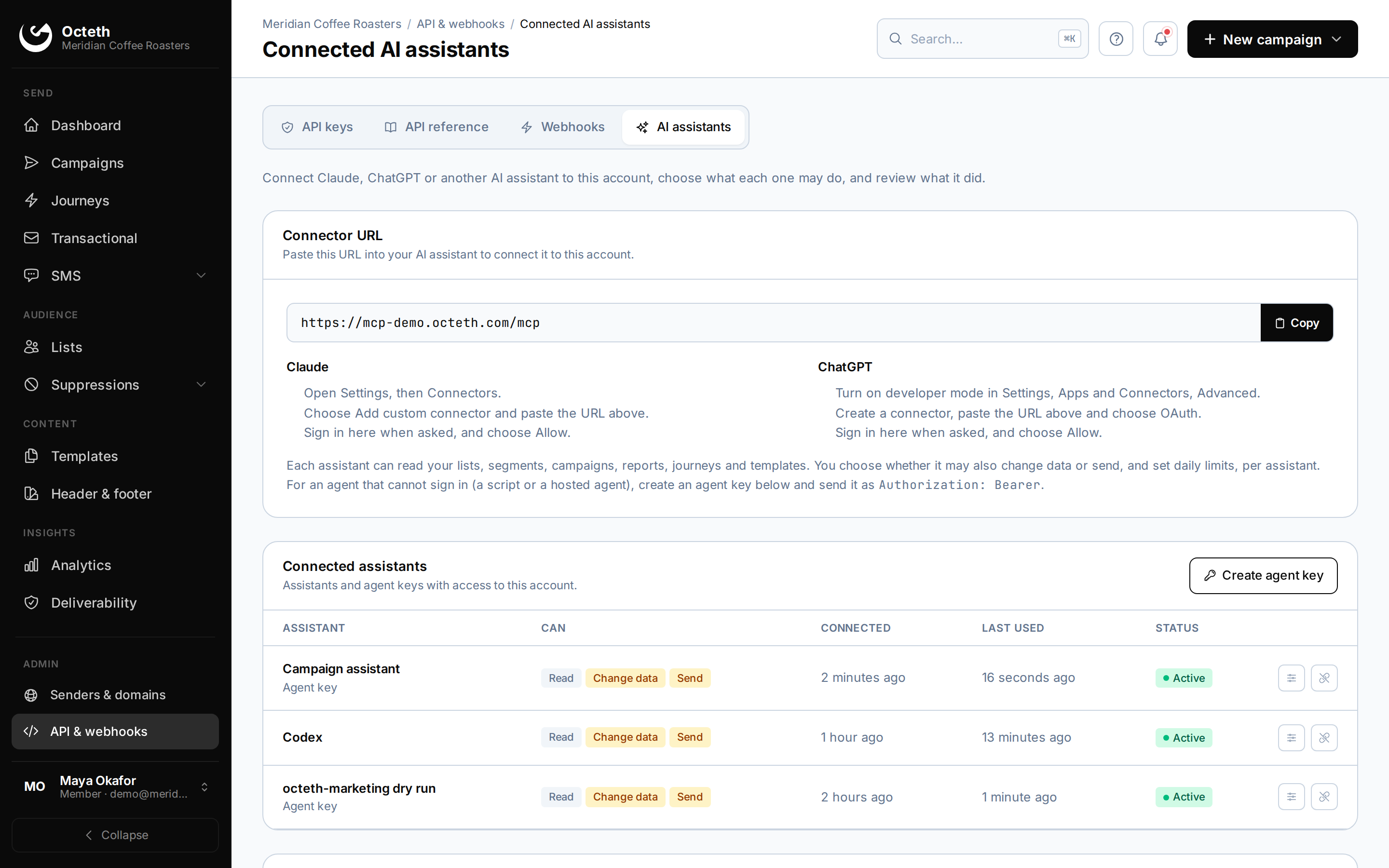
Open API & webhooks, then Connected AI assistants, in your Octeth.
- 2
Paste it into your assistant
Claude, ChatGPT or your coding agent. No install, no API key to copy.
- 3
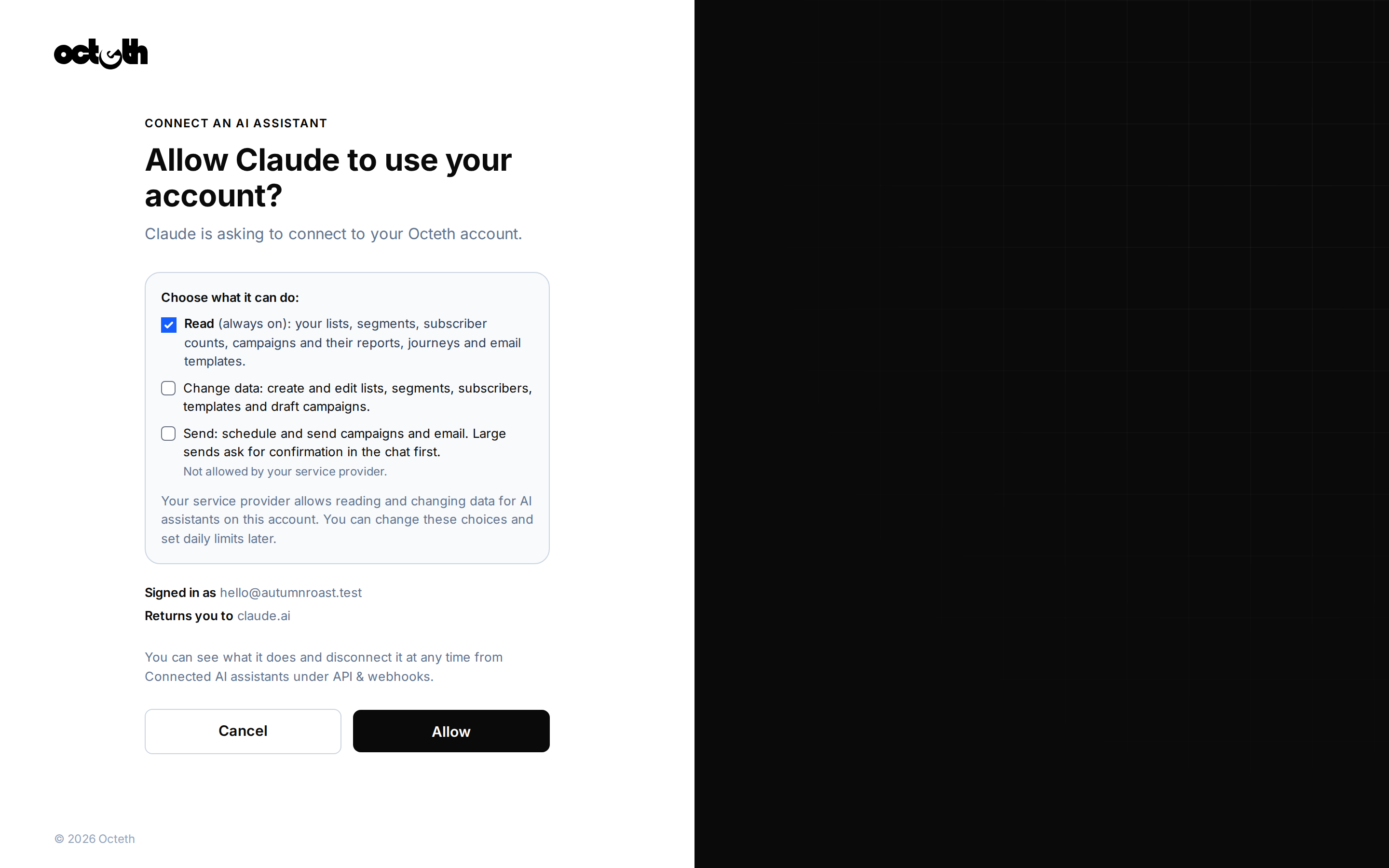
Sign in and choose what the agent may do
Your normal Octeth sign-in, two-factor included. The consent screen shows read, change data and send.
The connector URL is on your own Octeth domain, for example
https://mail.yourbrand.com/mcp.
This page is not a connector.
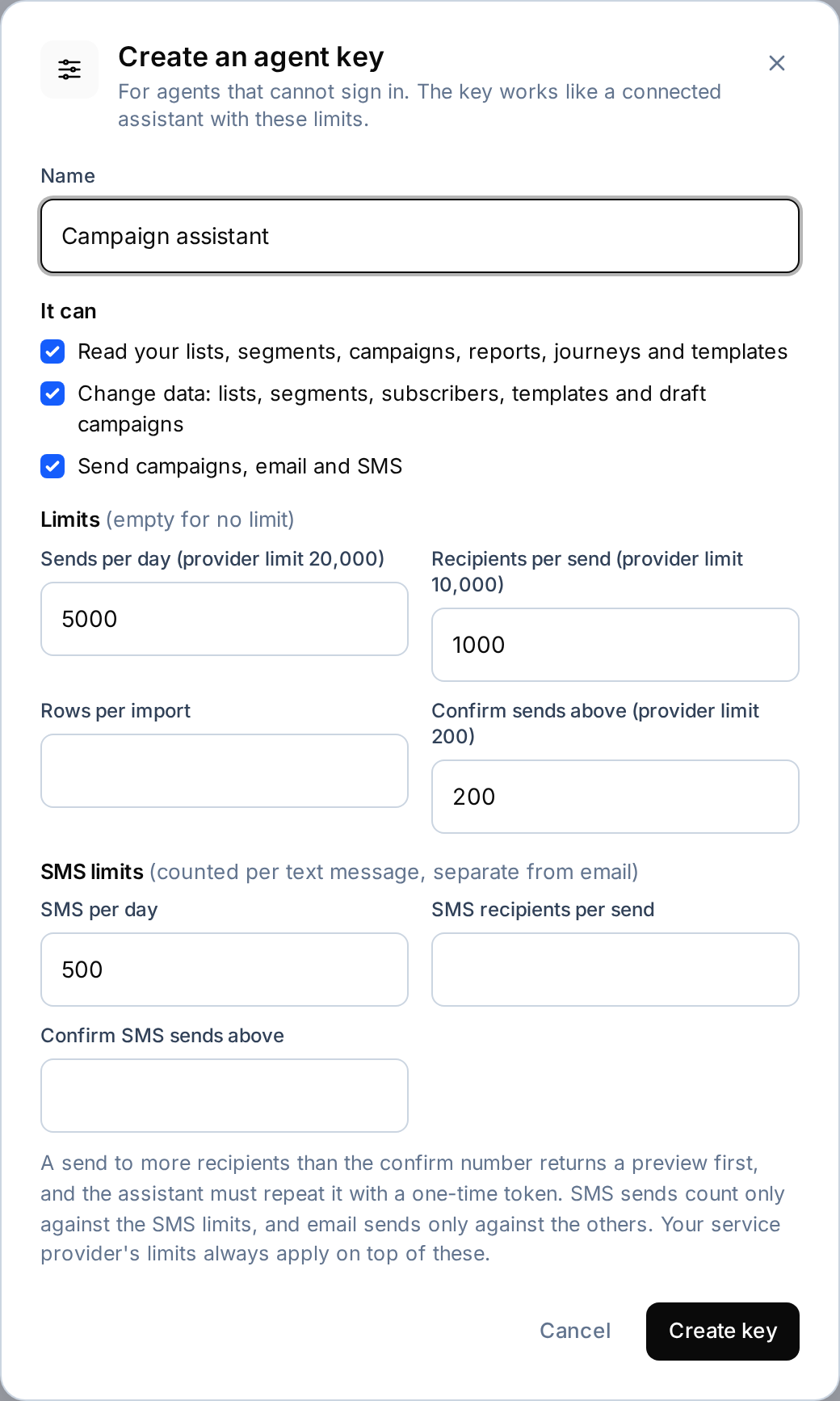
Scripts and hosted agents use an agent key instead of a sign-in, with the same limits.
Controls
Powerful for your clients. Under your rules
Before you hand an agent to every client, you decide what it may do. The limits sit in Octeth, not in the assistant.
-
Read, change data and send are separate
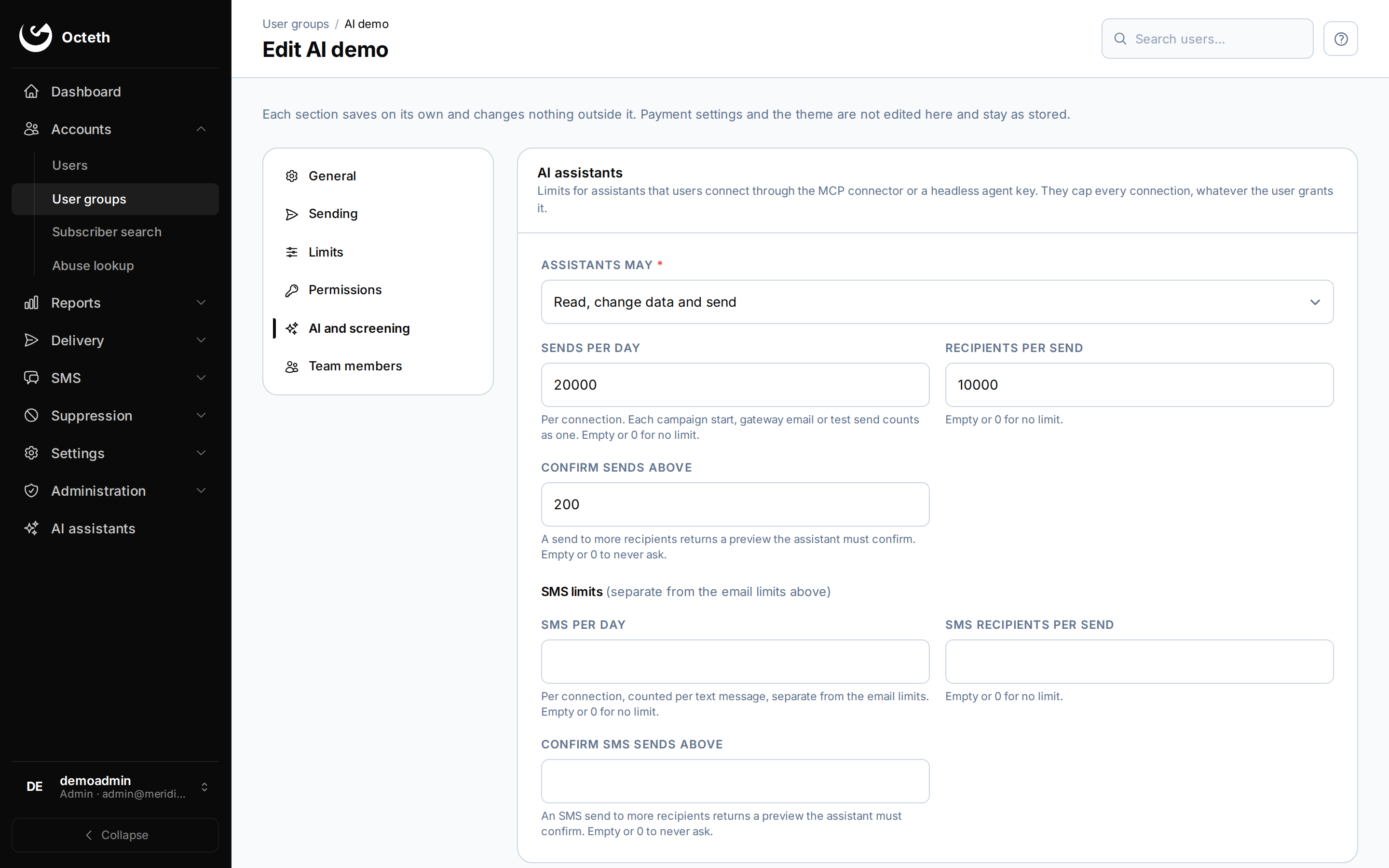
Each permission is granted on its own, and the operator sets which ones each user group may give: off, read only, change data or send.
-
Caps you set per user group
The operator sets a daily send limit, a maximum number of recipients per send and a confirmation threshold for each user group. SMS has its own three limits. Clients can tighten them, never loosen. A limit you leave empty does not apply.
-
Large sends and deletes wait for a yes
A send above your confirmation threshold, or a delete of lists, fields, segments, campaigns, journeys, subscribers, tags or SMS items, returns a preview and a one-time token instead of acting. The agent shows you the preview and repeats the call only after you approve. Tokens expire in 10 minutes.
-
Enforced in the API
The limits live in Octeth's API, not only in the connector, so direct API calls with an agent key hit the same rules and get clear error codes.
-
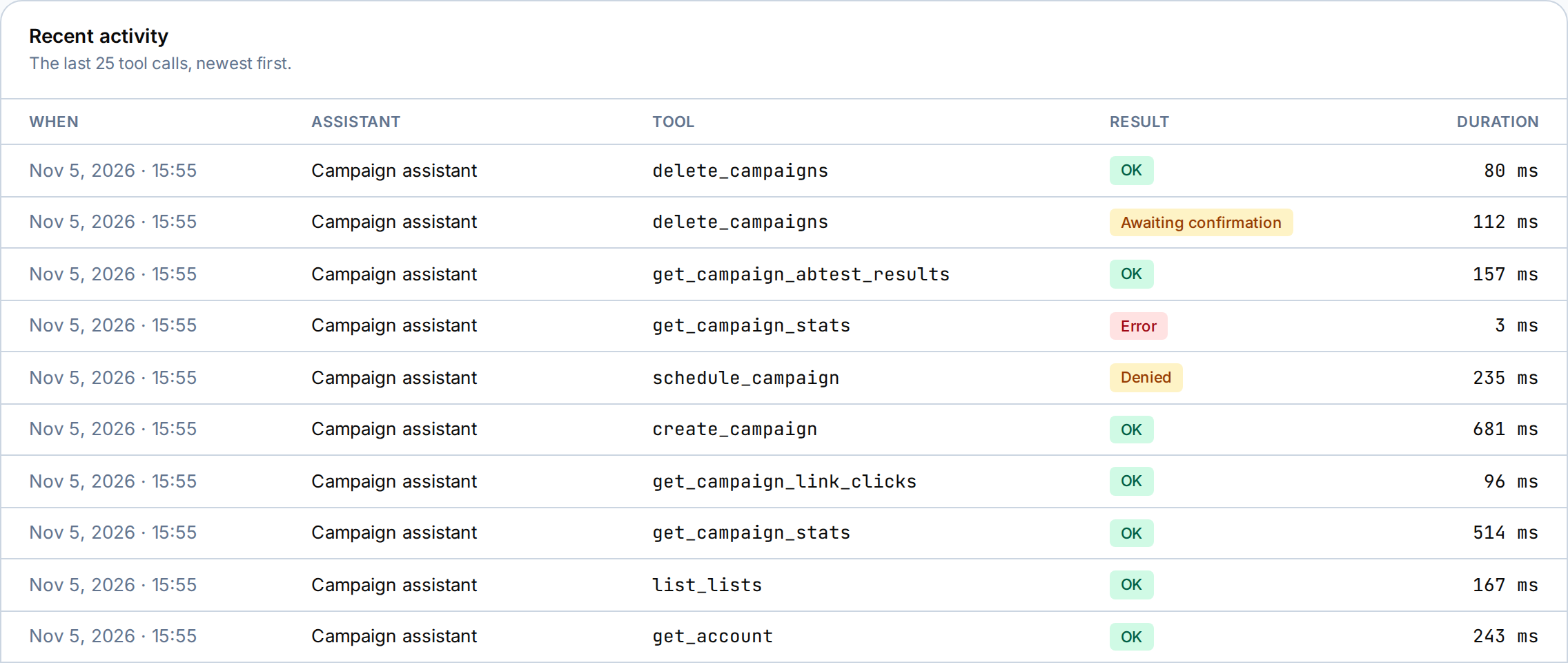
Every call logged, one click to revoke
Connected AI assistants lists each assistant and agent key, and the last 25 tool calls through the connector with their result. Disconnect revokes access at once.
Running Octeth for clients? See how it works for agencies and as a white-label email platform.
Operators
An agent for your own team
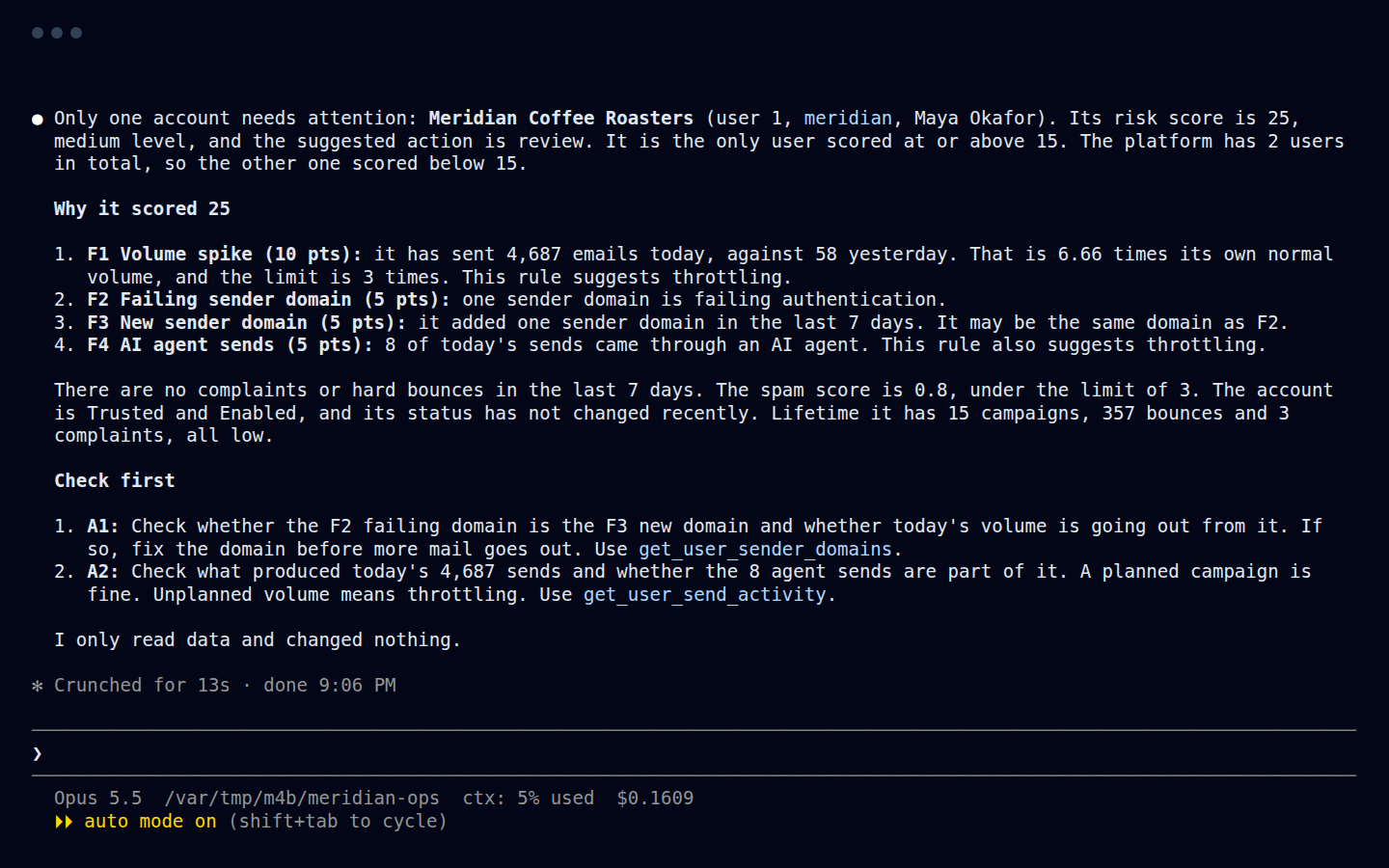
Staff connect too, with operator tools for the whole platform. Ask Claude Code which accounts need attention this morning, then act on them.
-
Watch. A morning risk digest of the accounts that need attention, one user's send activity, sender domains and risk, delivery metrics and stuck campaigns.
risk_digestget_user_riskget_user_send_activitylist_stuck_campaigns -
Act, with a preview first. Throttle a user, suspend one, or require approval for their campaigns. Each action shows what will change and waits for confirmation.
throttle_usersuspend_userrequire_campaign_approval -
Set up. Ask what is left to configure, then create and test delivery servers, user groups and bounce and FBL mailboxes. The agent reads alerts. Alert rules are added on the server.
get_setup_statuscreate_delivery_servertest_delivery_servercreate_user_group
Hard limits: passwords are write-only, secrets are redacted, the agent only changes delivery servers it added itself with no mail flowing, and it never touches server configuration or restarts containers.
Developers
Built for developers and agents
- Discovery, on by default.
/llms.txtand/agents/openapi.json, an OpenAPI 3.1 description of every command an agent key may call, with permissions and error codes. - Refusals an agent can read. Error codes 100010 to 100016 tell the agent why a call was refused, so it reports back instead of retrying.
- A local option. The
@octeth/mcpnpm package runs locally and supports several accounts at once. - Install and upgrade by agent. Coding agents can install and upgrade Octeth itself from the agent install guide.
claude mcp add --transport http octeth https://mail.yourbrand.com/mcpThen type /mcp in Claude Code, choose octeth and Authenticate.
Hosting
Self-hosted, so it stays yours
Your servers, your domain
The connector runs inside your Octeth installation, under your own domain. There is no separate connector service to sign up for.
One account per connection
Each client's agent sees only that client's account, through the same rules as the rest of Octeth.
Off with one setting
Set MCP_ENABLED=false and the connector is gone for the whole installation.
Included in every license, including the free Community License. Needs Octeth v6.0.2 or later.
FAQ
Questions, answered.
What agents can do, what they can't, and how you keep control.
More questions? Book a callMCP (Model Context Protocol) is the open standard AI assistants use to call tools in other software. Octeth's MCP server gives Claude, ChatGPT and other agents tools for your email and SMS marketing account: lists, segments, campaigns, journeys, SMS and reports. It is a marketing platform's MCP, not a mailbox reader for your personal inbox.
Yes, if your connection has the send permission. The agent can build the segment, write and spam-test drafts, send you a test, and send or schedule the campaign. Sends above your confirmation threshold show a preview and wait for your approval.
Anything your Octeth reports hold. Campaign stats, link clicks, who opened or clicked, A/B results, list analytics such as best send times and mailbox providers, journey performance per step, and SMS reports by carrier, country or hour. The agent can compare a campaign with your recent ones and explain the difference.
Claude (web and desktop), ChatGPT in developer mode, Claude Code, Codex, Gemini CLI and any remote MCP client that supports OAuth. Scripts and hosted agents connect with an agent key instead of a sign-in.
Octeth's MCP server runs on your own servers, under your own domain, as part of a self-hosted platform. Sending is a separate permission, with a daily cap, a per-send recipient limit and a confirmation threshold that you set per user group, and SMS has its own limits. It covers email and SMS in one account, and operators get their own staff tools for risk review and setup.
Only within the limits you set. Without the send permission it cannot send at all. With it, any send above the confirmation threshold returns a preview and a one-time confirm token, and the agent must show you the preview and repeat the call after you approve. There is no threshold until the operator or account owner sets one, so set it before you give an agent the send permission.
The limits you set, enforced in the Octeth API: a daily send limit, a maximum number of recipients per send, and a confirmation threshold. The operator sets them per user group and clients can tighten them per connection. A limit left empty does not apply. A confirmation cannot raise the per-send limit, and direct API calls with an agent key hit the same limits.
Yes. The operator sets an AI agent access policy per user group: off, read only, change data or send. Clients can tighten their own connections but never loosen the policy. MCP_ENABLED=false turns the connector off for the whole installation.
No. An assistant connected to an account only sees that account, through the same rules as the rest of Octeth.
Building or editing journey steps, exports, public archive links, SMS gateway settings, account-wide custom fields and changing a list's phone field once it is set stay in the app.
No. The connector is built into Octeth. Copy the connector URL from Connected AI assistants, paste it into your assistant and sign in. Developers who want a local server can use the @octeth/mcp npm package.
Octeth v6.0.2 or later. Upgrade to the current release for the full set of tools.
Yes. The connector is included in every Octeth license, including the free Community License.
Ask Octeth for your next campaign
See it run against a real Octeth in a demo, and bring your own questions.